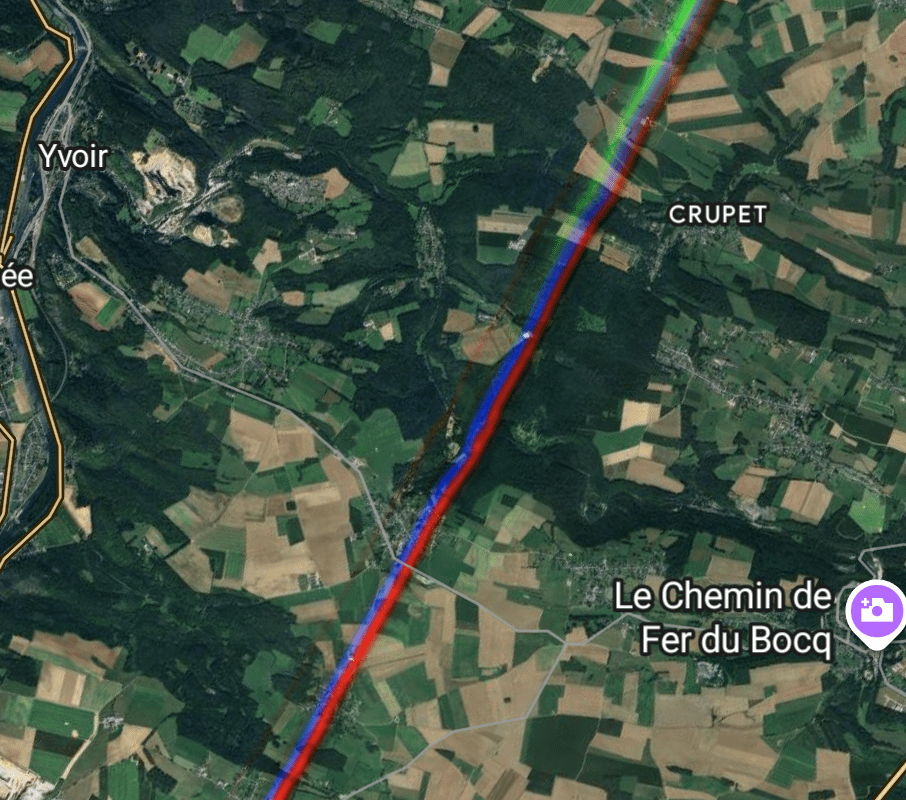
Weird artifact on Google maps satellite image
Title: Unraveling the Mystery: Weird Artifact Spotted on Google Maps Satellite Image
Meta Description: Discover the strange, unexplained artifacts appearing on Google Maps satellite imagery. Learn what causes these glitches, famous examples, and whether they’re evidence of something more mysterious.
Introduction: The Digital World’s Hidden Oddities
Google Maps satellite view is an indispensable tool for navigation, exploration, and even armchair tourism. But sometimes, users stumble upon bizarre, unexplained images: distorted landscapes, phantom structures, or eerie shapes that defy logic. These “weird artifacts” spark curiosity, conspiracy theories, and debates worldwide. What causes these glitches, and do they hint at hidden secrets—or are they just technological hiccups? Let’s dive into the phenomenon.
What Are Google Maps Satellite Artifacts?
Satellite artifacts are visual anomalies caused by data errors during image capture, processing, or stitching. Google compiles its maps from vast databases of satellite and aerial imagery, captured by providers like NASA, NOAA, and private companies. Occasionally, these images show strange patterns due to:
- Stitching Errors: Overlapping images misalign, creating “seams” or duplicated objects (e.g., cars or buildings appearing twice).
- Cloud or Atmospheric Interference: Cloud cover, haze, or reflections can distort colors or shapes.
- Sensor Malfunctions: Satellite cameras may capture visual noise, streaks, or pixelated blobs.
- Sun Glare: Bright light reflecting off water, glass, or metal creates phantom shapes.
- Temporal Changes: Updates may accidentally layer old/new images, producing “ghost” structures.
Famous Examples of Strange Google Maps Artifacts
1. The “Street Tsunami” in Arizona, USA
In 2020, users spotted a residential street in Tucson seemingly submerged under a massive wave. The anomaly was likely caused by overlapping aerial images taken during heavy rainfall, which blended water reflections with the road.
2. The “UFO Lake” in Kazakhstan
A circular, metallic-looking structure in a remote lake sparked alien rumors. It was later identified as a water management facility, but its distorted satellite appearance—likely due to sun glint—made it look extraterrestrial.
3. The “Crashed UFO” in Antarctica
A blurry, saucer-shaped object spotted near the South Pole went viral in 2022. Experts attribute it to ice formations combined with compression artifacts in low-resolution imagery.
4. The “Portal to Hell” in Turkmenistan
The Darvaza Gas Crater, a natural gas fire pit, appears as a fiery orange spot on satellite maps. While not a glitch, its surreal look has cemented its status as a “weird” landmark.
Conspiracy Theories vs. Reality
Artifacts often ignite wild speculation—from alien bases to government cover-ups. For instance:
- Area 51 “UFO” Shapes: Distorted aircraft shadows have fueled decades of extraterrestrial lore.
- Pyramid in Antarctica: An alleged “man-made” pyramid turned out to be a glacial nunatak (rock formation).
The Truth: Most artifacts are easily explained by technical limitations. Google’s algorithms prioritize usability over perfect visuals, meaning minor errors slip through. Plus, remote or low-traffic areas may use outdated or low-res imagery, amplifying distortions.
How to Spot (and Report) Google Maps Artifacts
Want to hunt for glitches yourself? Here’s how:
- Zoom In/Out: Some artifacts only appear at specific resolutions.
- Toggle Between Layers: Switch between satellite, terrain, and standard views to spot inconsistencies.
- Check Historical Imagery: Use Google Earth’s timeline tool to see if the anomaly persists.
- Report to Google: Click “Report a problem” to flag errors for correction.
Pro Tip: Always cross-reference with other platforms (e.g., Apple Maps, Bing Maps) to confirm if the artifact is a Google-specific issue.
Why Do These Glitches Fascinate Us?
Humans are wired to seek patterns—a trait called pareidolia (seeing faces in clouds, for example). Satellite artifacts tap into this instinct, turning pixelated blurs into stories. In an age of digital immersion, these “mysteries” remind us that technology isn’t flawless—and that the world still holds unexplored corners.
Conclusion: The Art of Imperfection
While weird Google Maps artifacts rarely signal anything sinister, they highlight the complexity of modern cartography. Next time you spot a floating island or a geometric oddity, remember: you’re likely witnessing a quirk of data, not a doorway to another dimension. Still, they make for great conversation starters—and proof that truth can be stranger than fiction, even in pixels.
Keywords for SEO:
Google Maps satellite glitch, weird artifact Google Earth, unexplained map errors, satellite image anomalies, map stitching errors, Google Maps mysteries, strange satellite images.
Engage With Us: Have you found a bizarre Google Maps artifact? Share your screenshot in the comments below!