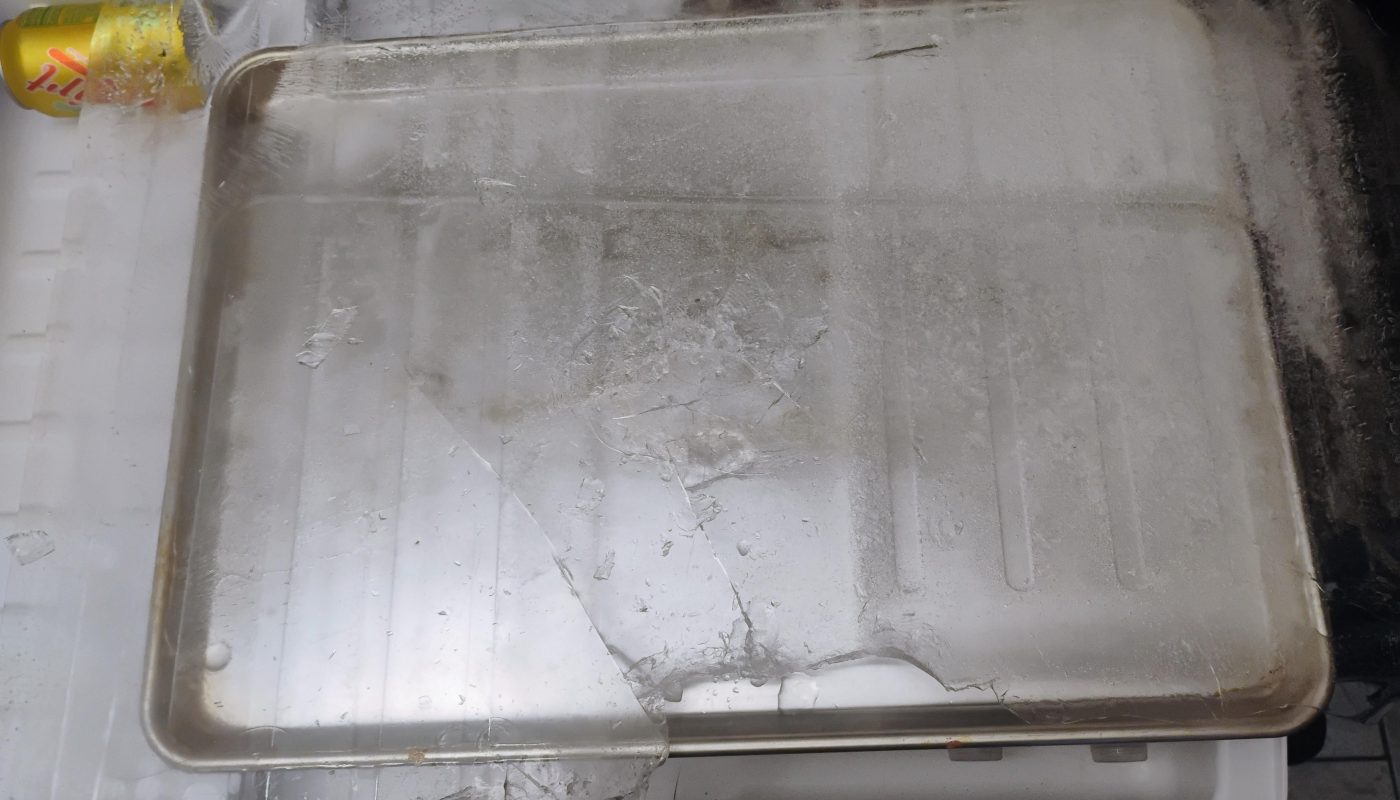
Our Samsung refrigerator leaks and the bottom drawer won't open due to the ice sheet formed underneath. This is the first time the majority of it came out in one piece. Small victory 🙌
Unlock Peak Performance: Your Guide to the Samsung Refrigerator Monthly Purge
Does your Samsung refrigerator occasionally hum louder than usual, followed by a brief whirring or water-dripping sound? Don’t panic—this might be its built-in Monthly Purge Cycle at work! This automated feature ensures your fridge stays frost-free and energy-efficient. In this guide, we’ll explore how the Samsung Monthly Purge works, why it’s essential, and how to troubleshoot common issues.
What Is the Samsung Refrigerator Monthly Purge?
The Monthly Purge Cycle is a self-maintenance feature exclusive to select Samsung refrigerators (typically models with Twin Cooling Plus™ technology). Once every 30 days, the system activates to:
- Melt frost buildup in the freezer.
- Prevent ice accumulation around the evaporator coils.
- Improve cooling efficiency by ensuring airflow isn’t blocked by frost.
This “automatic defrost” process lasts 15–40 minutes and may cause temporary noises or a small volume of water in the drip pan.
Why Is the Monthly Purge Cycle Important?
Ignoring this cycle can lead to:
- ❄️ Excessive frost in the freezer compartment.
- 🔋 Higher energy bills (frost forces the compressor to overwork).
- 🌡️ Temperature fluctuations, risking food spoilage.
By allowing Samsung’s smart technology to handle defrosting, you extend your fridge’s lifespan and protect your groceries.
How Does the Monthly Purge Work?
Here’s what happens behind the scenes:
- The Cycle Activates: Your fridge triggers the purge automatically after ~720 hours of operation (about 30 days).
- Frost Removal: The system temporarily redirects cool air from the fridge to the freezer to melt ice.
- Drainage: Melted water flows into a drip pan, where it evaporates harmlessly.
- Resumption of Cooling: Normal operation resumes once the cycle completes.
Note: Food stays safely chilled during the cycle—no need to relocate items!
Troubleshooting Common Monthly Purge Issues
❗ Problem 1: Frost Builds Up Anyway
Solution:
- Ensure vents inside the fridge/freezer aren’t blocked by food.
- Check door seals for gaps or debris.
- Reset the fridge by unplugging it for 5 minutes.
❗ Problem 2: Loud Noises or Error Codes (e.g., “33E”)
Solution:
- A “grinding” noise during purge is normal. Continuous loud sounds may signal a faulty evaporator fan.
- Error code “33E” indicates a sensor issue—contact Samsung support.
❗ Problem 3: Water Pooling Inside the Fridge
Solution:
- Confirm the drain hose (located at the back of the fridge) isn’t clogged. Clean it with warm water and a pipe cleaner.
Maintenance Tips to Support the Purge Cycle
- Clean the Condenser Coils every 6–12 months to boost efficiency.
- Avoid overloading shelves, which restricts airflow.
- Check door seals monthly—place a dollar bill in the door; if it slips out easily, seals need replacing.
- Keep the freezer 70% full for optimal temperature retention.
FAQ: Samsung Monthly Purge Cycle
Q: Can I disable the Monthly Purge?
A: Not recommended! Skipping it risks frost damage. Some models let you delay the cycle via the Samsung SmartThings app.
Q: Does the purge raise my fridge’s temperature?
A: Temperatures may fluctuate slightly but stay within safe limits for food storage.
Q: How long does the cycle take?
A: Typically 15–40 minutes, depending on frost levels.
Conclusion
Embrace Samsung’s Monthly Purge Cycle—it’s a hands-off way to keep your refrigerator running smoothly, reduce energy waste, and preserve food freshness. If issues persist after troubleshooting, schedule service via Samsung’s official support channels to protect your appliance investment.
Pro Tip: Pair the Monthly Purge with annual professional maintenance for peak fridge performance!
Target Keywords:
- Samsung refrigerator monthly purge
- Defrost cycle Samsung fridge
- Fix Samsung freezer frost
- Samsung Twin Cooling Plus
- Refrigerator self-cleaning cycle
Boost your appliance’s longevity—let Samsung’s smart tech handle the hard work! 🧊✅