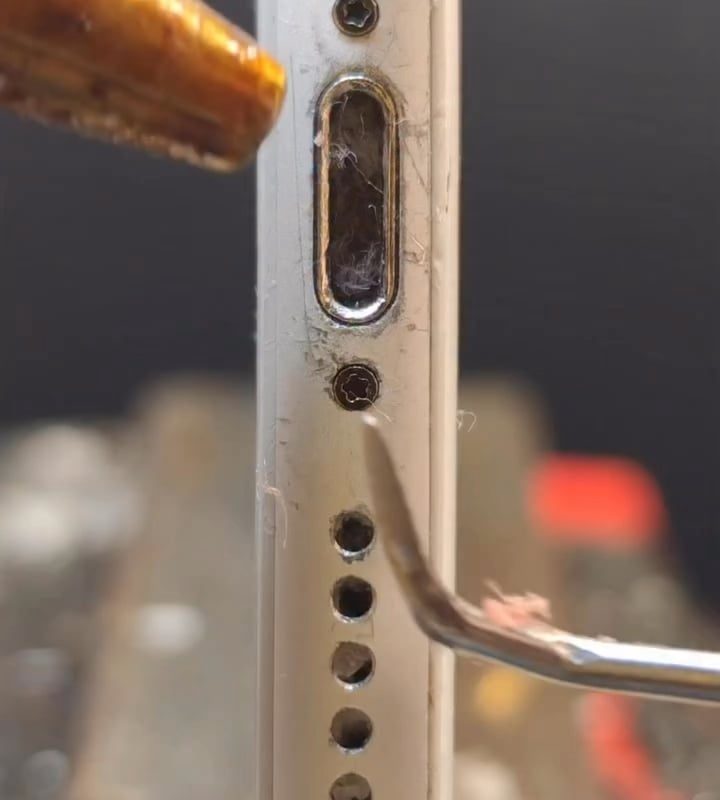
Cleaning a iPhone charging port
Title: How to Clean Your iPhone Charging Port Safely: Step-by-Step Guide (2024)
Is your iPhone not charging properly? Do you notice a loose connection or debris inside the port? Over time, lint, dust, and grime can accumulate in your iPhone’s charging port, preventing the Lightning or USB-C cable from making proper contact. Before you panic about a faulty battery or damaged device, try cleaning the port! This step-by-step guide will show you how to safely clean your iPhone charging port at home, using tools you already have.
Why Cleaning Your iPhone Charging Port Matters
A dirty charging port can cause:
- Slow or interrupted charging
- Cables not fitting snugly
- “Accessory not supported” errors
- Complete charging failure
Ignoring buildup risks permanent damage to the port’s delicate pins or corrosion from moisture. Regular cleaning ensures reliable charging and extends your iPhone’s lifespan.
Tools You’ll Need (Safe & Household Items)
- Soft-bristled brush: A clean toothbrush, anti-static brush, or makeup brush.
- Toothpick: Wooden or plastic (avoid metal).
- Compressed air: A canister designed for electronics.
- Flashlight: To inspect the port closely.
- Magnifying glass or zoomed camera (optional).
⚠️ NEVER USE: Metal objects, water, paper clips, or excessive force—all risk damaging internal pins.
Step 1: Power Down Your iPhone
Prevent electrical shorts by turning off your iPhone. Hold the power button (with or without volume buttons, depending on the model) and slide to power off.
Step 2: Inspect the Charging Port
Use a flashlight to examine the port in good lighting. Look for:
- Lint or dust bunnies (common from pockets/purses).
- Dark debris (pocket grime/sand).
- Bent/rusted pins (metal contacts inside the port).
Don’t proceed if you see corrosion or bent pins—visit Apple Support for professional help.
Step 3: Gently Brush Away Loose Debris
- Use a dry, soft-bristled brush (toothbrush or anti-static brush).
- Lightly swipe the bristles side to side inside the port—don’t jam downward.
- Blow away loosened debris with compressed air (hold the can upright, 1–2 inches away).
Step 4: Remove Stubborn Grime with a Toothpick
Skip this if brushing clears the blockage!
- Break off the sharp tip of a wood/plastic toothpick to avoid scratching.
- Carefully scrape the port’s inner walls in short strokes. Do not touch the central pins!
- Tilt debris upward and out—don’t push it deeper.
No compressed air? Use a dry q-tip or roll paper into a point (minimal fibers).
Step 5: Final Air Blast & Test
- Use compressed air again to flush remnants. Don’t blow with your mouth—saliva causes corrosion!
- Plug your charger in to test. If it fits tightly and charges, congrats—you’re done!
If charging still fails:
- Try a different cable or outlet to rule out other issues.
- Contact Apple Support—there may be internal damage.
Common Mistakes to Avoid
- Metal tools (paper clips, SIM ejectors): Scratch pins, void warranty.
- Moisture/Liquids: Water worsens corrosion. Use 90% rubbing alcohol only on connectors—not the port itself.
- Vacuum cleaners: Static electricity can harm electronics.
How Often Should You Clean the Port?
Clean every 3–6 months if you carry your iPhone in pockets/bags, or if you notice charging issues.
When to Seek Professional Help
- Corrosion or water damage (white/green buildup).
- Bent/missing pins in the port.
- Problem persists after cleaning.
FAQs
Q: Does cleaning the charging port void Apple’s warranty?
A: No, if done correctly. But physical damage from tools (scratches, bent pins) might void coverage.
Q: Can I use a cotton swab (Q-tip)?
A: Not recommended—fibers can shred and stick. Use microfiber cloth on connectors only.
Q: My iPhone 15 has USB-C—is cleaning different?
A: USB-C ports are more durable but still collect debris. Avoid liquid cleaners on USB-C contacts.
Key Takeaways
Cleaning your iPhone’s charging port is a quick, cost-free fix for most charging hiccups. With gentle tools and patience, you can restore secure connections in minutes—saving time, money, and frustration. Prevent buildup by storing your phone in clean cases and avoiding dusty environments.
Found this helpful? Share it with friends struggling with unreliable iPhone charging! 🧹⚡