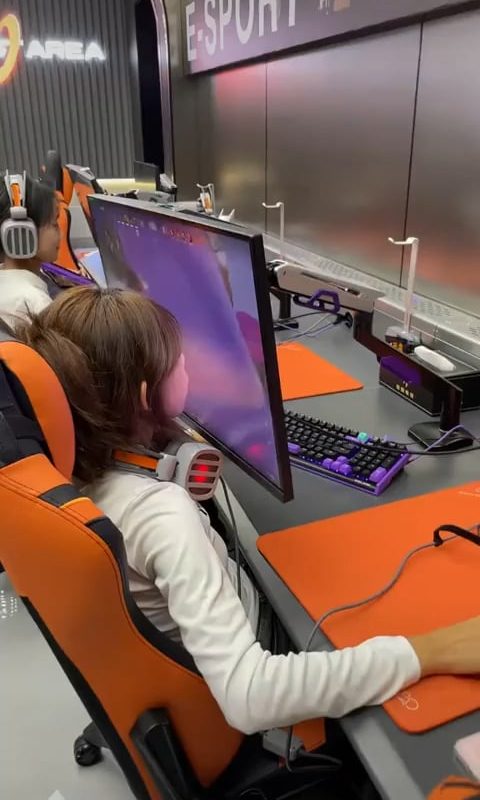
Gaming setups
Crafting Your Ultimate Gaming Setup: A Step-by-Step Guide to Level Up Your Experience
Gaming has evolved from a casual hobby to a lifestyle—and your setup is your command center. Whether you’re a competitive esports pro, a streaming content creator, or a weekend warrior, the right gaming setup can transform performance, comfort, and immersion. Here’s how to build (or upgrade) your dream gaming rig, piece by piece.
1. Start with the Heart: Choose Your Gaming Platform
The foundation of your setup begins with your core hardware: a powerful gaming PC, console, or hybrid setup.
- Gaming PC: Prioritize a high-end CPU (Intel Core i5/i9 or AMD Ryzen 5/9), a GPU like NVIDIA RTX 40-series or AMD Radeon RX 7000, and at least 16GB of RAM. Custom builds offer flexibility; pre-built rigs save time.
- Consoles (PS5, Xbox Series X/S): Ideal for plug-and-play convenience. Pair with a high-refresh-rate monitor for smoother gameplay.
- Hybrid Setup: Use a capture card to stream console gameplay from a PC.
Pro Tip: Invest in future-proof parts. SSD storage (1TB+) ensures fast load times.
2. Display Matters: Monitors & Resolution
Your monitor is your window to the virtual world. Don’t compromise:
- Refresh Rate: 144Hz or 240Hz panels are essential for fast-paced games (e.g., FPS or battle royales).
- Resolution: 1080p (budget-friendly), 1440p (ideal balance), or 4K (for premium detail).
- Panel Type: IPS for color accuracy, TN for speed, or OLED for deep blacks.
- Size & Ergonomics: 24-27″ for competitive play; 32″+ for immersion. Use a VESA mount for adjustable positioning.
Bonus: Consider ultra-wide or curved screens for racing/fantasy games.
3. Peripherals: Precision Meets Comfort
These tools are your direct link to the game:
- Keyboard: Mechanical keyboards (Cherry MX, Razer switches) for tactile feedback. Opt for tenkeyless (TKL) models to save desk space.
- Mouse: Lightweight (under 80g) with adjustable DPI (e.g., Logitech G Pro X Superlight).
- Controller: Use Xbox Elite or DualSense Edge for customizable paddles.
- Mousepad: Large desk mats (900x400mm) stabilize aim and protect surfaces.
Pro Tip: Hot-swappable keyboards let you change switches without soldering.
4. Audio: Immerse Yourself in Sound
Great audio boosts spatial awareness and atmosphere:
- Headsets: Look for Dolby Atmos, THX Spatial Audio, or 7.1 surround sound. Wired minimizes latency; wireless offers freedom (e.g., SteelSeries Arctis Nova Pro).
- Speakers: Bookshelf speakers (Edifier, Razer Nommo) enhance single-player immersion.
- Microphone: XLR mics (Shure SM7B) or USB options (HyperX QuadCast) for crisp streaming vocals.
Bonus: Sound-dampening foam panels reduce echo in stream rooms.
5. Ergonomics: Play Longer, Stay Healthier
Gaming marathons require support:
- Chair: Ergonomic models with lumbar support (Secretlab Titan, Herman Miller) prevent back strain.
- Desk: Height-adjustable standing desks (like Uplift V2) or L-shaped layouts maximize space. Ensure clearance for mouse movement.
- Posture: Keep monitors at eye level and wrists neutral with padded rests.
6. Aesthetics & Ambiance: Set the Mood
Customize your space to inspire:
- RGB Lighting: LED strips (Philips Hue), NanoLeaf panels, or PC case lighting sync with games via software like Razer Chroma.
- Cable Management: Use sleeves, under-desk trays, and velcro ties to avoid clutter.
- Decor: Wall art, figurine shelves, or themed posters personalize your battlestation.
7. Networking: Stay Lag-Free
Don’t let poor internet hold you back:
- Router: Wi-Fi 6E (ASUS ROG Rapture) minimizes ping spikes.
- Ethernet: Always use a wired connection for competitive gaming.
- Power: Surge protectors and UPS backups protect hardware.
8. Streaming & Content Creation Add-Ons
For streamers and creators:
- Webcam: 4K models (Sony ZV-E10 or Logitech Brio) capture crisp footage.
- Green Screen: Collapsible chromakey backdrops create professional overlays.
- Control Deck: Elgato Stream Deck simplifies scene switching and alerts.
Budget-Friendly Tips: Build Smart
- Repurpose older monitors as secondary displays.
- Buy open-box peripherals from certified retailers.
- DIY mods (PVC pipe headset stands, foam panels) save cash.
Final Thoughts
A gaming setup is deeply personal—balance performance, comfort, and style to match your needs. Start with essentials (PC, monitor, peripherals), then level up with aesthetics and ergonomics. With this guide, you’re ready to dominate in-game and wow on-stream.
Now power up, and game on!
SEO Keywords: Gaming setup ideas, best gaming PC setup 2024, ergonomic gaming chair, streaming battlestation, budget gaming desk, gaming monitor guide, RGB lighting for gamers.