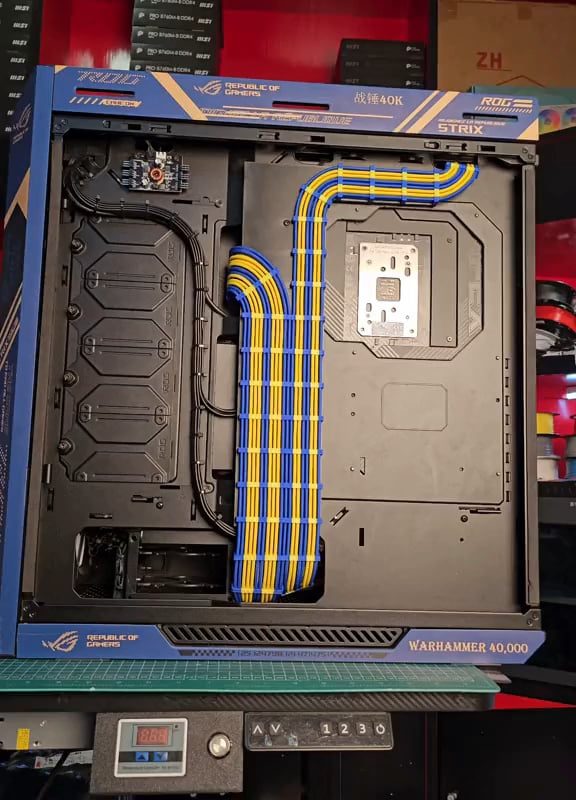
cable management of this PC
The Ultimate Guide to PC Cable Management: Organize for Performance & Aesthetics
Why Cable Management Matters
Cable management is far more than a cosmetic upgrade for your PC. Tangled wires obstruct airflow, trap heat, increase dust buildup, and turn upgrades into frustrating puzzles. A well-organized system runs cooler, looks professional, and simplifies maintenance. Whether you’re building a gaming rig, workstation, or compact PC, mastering cable management is non-negotiable.
Benefits of Proper PC Cable Management
-
Improved Airflow & Cooling
Neatly routed cables create clear pathways for airflow, preventing hot zones around your GPU, CPU, and drives. Lower temperatures mean quieter fans and longer hardware lifespan. -
Easier Upgrades & Repairs
Labeled, grouped cables save hours of troubleshooting when adding RAM, swapping drives, or upgrading components. -
Professional Aesthetics
Showcase your build with clean lines—no spaghetti mess distracting from RGB lighting or sleek components. -
Reduced Dust Buildup
Fewer nooks for dust to gather means less frequent cleaning and better component longevity. -
Safety First
Loose cables can snag fans, cause shorts, or block critical connections.
Essential Cable Management Tools
- Zip Ties & Velcro Straps: Reusable Velcro is ideal for adjustments; zip ties offer permanence.
- Cable Combs: Organize GPU and motherboard cables into uniform lines (perfect for RGB builds).
- Cable Extensions/Sleeves: Custom-length cables reduce slack; sleeved bundles add color/style.
- Modular Power Supply (PSU): Use only the cables you need, eliminating clutter.
- Magnetic Screw Tray: Keep screws and ties handy during assembly.
Step-by-Step Cable Management Guide
1. Plan Before You Plug
- Map Your Routes: Identify paths behind the motherboard tray and through grommets.
- Group by Destination: Separate fan cables, SATA/data cables, and PSU cables.
- Test Boot First: Verify all components work before cable management (prevents rework).
2. Route Cables Strategically
- Back-Side Routing: Utilize the rear chamber of your case. Secure cables to anchor points.
- Use Grommets Wisely: Pass cables through rubber case grommets to hide them and reduce wear.
- Prioritize Large Bundles: Route 24-pin motherboard and GPU PCIe cables first—they’re the bulkiest.
3. Secure & Conceal
- Zip Tie Tightly (But Not Too Tight): Bundle parallel cables every 2–3 inches, avoiding sharp bends.
- Tuck Excess Length: Coil extra PSU cable length behind the PSU shroud (if available).
- Label Critical Cables: Use tape or tags on fan headers and RGB connectors for quick ID.
4. Component-Specific Tips
- GPU Power Cables: Route vertically with combs for a clean look. Daisy-chained? Prioritize direct PSU connections for high-wattage cards.
- SATA Cables: Use right-angled connectors to save space near drives.
- Front Panel Wires (Power/Reset): Group and route behind the motherboard tray.
Common Cable Management Mistakes to Avoid
- Ignoring the PSU Shroud: Hide power cables here for instant visual improvement.
- Overstuffing Behind the Motherboard: Bulging panels warp cases and stress connectors.
- Forgetting Fan Headers: Connect case fans to a hub or splitter to minimize wires.
- Daisy-Chaining Risers: Avoid linking multiple PCIe devices on one cable—use separate PSU rails instead.
Advanced Techniques for Enthusiasts
- Custom Sleeving: Hand-sleeve cables in paracord or thermoplastic for a boutique finish.
- Undervolting: Reduce power draw (and cable clutter) by optimizing CPU/GPU voltage.
- Internal USB Hub: Consolidate RGB controllers, AIO pumps, and peripherals into one header.
Final Checklist for Perfect Cables
✅ All cables secured behind the motherboard tray or under shrouds.
✅ No cables touching fans or obstructing airflow.
✅ Critical connectors labeled via tags or color-coding.
✅ Gentle bends—no kinks or strained connectors.
✅ Excess PSU cables stored (never stuffed into drive bays).
Conclusion
Cable management transforms a functional PC into a high-performance work of art. With patience and the right tools, even budget builds can achieve immaculate organization. Start small, iterate often, and remember: every minute spent perfecting cables pays dividends in cooling, aesthetics, and future-proofing.
Pro Tip: Still stuck? Share a photo of your build in PC forums—communities like Reddit’s r/CableManagement offer personalized advice!
Rank Keywords: PC cable management, cable management tips, how to manage PC cables, PC build cable organization, wire management gaming PC.